
Zoom already has everything you need for effective Zoom team building — screen-share, breakout rooms, reactions, polls and a whiteboard. The trick isn't the tool; it's picking games that suit video and running them with a little structure.
Here are 12 Zoom team building games that actually work for virtual team building events, and exactly how to run each one.
Quick picks
- Best all-rounder: live Trivia (run it with Zoom Polls or the chat)
- Best for laughs: Pictionary on the Zoom whiteboard
- Best for bonding: a breakout-room scavenger hunt
1. Trivia
The dependable crowd-pleaser. Screen-share your questions (or use Zoom's built-in Polls), teams confer in breakout rooms or the chat, answers go in the chat. Vary the categories so different people get their moment. Great for any size.
2. Pictionary (Zoom whiteboard)
Use Share → Whiteboard (or Annotate on a shared screen). One person draws a DM'd prompt; everyone guesses in the chat. Zero setup, always funny. Best for 4–12.
3. Charades
Classic acting game, perfect for video. DM the performer a word, they act it out on camera (mic muted), the rest guess aloud or in chat. Add a timer for energy. Best for 4–12.
4. Two truths and a lie
Each person shares three "facts"; the team votes (reactions or chat) on the lie. The fastest way to learn something surprising about a colleague. Great for any size, especially new teams.
5. Bingo
Make themed cards ("things said on calls", company in-jokes); share a card link or screen-share it. Call items live; first to a line types "Bingo!" Great for 5–30+.
6. Name That Tune
Screen-share and play short clips (enable Share computer sound); first to name the song or artist in chat wins. Build playlists by decade for instant nostalgia. Best for 5–20.
7. Scavenger hunt (breakout rooms)
Call out an item ("something blue", "your favourite mug"); players dash off-camera and race back. Run it in breakout rooms for bigger groups, then regroup. High energy, gets people moving. Great for any size.
8. Guess the desk / baby photo
Everyone submits a photo of their workspace (or a childhood photo) beforehand; the host screen-shares them and the team guesses whose is whose. Surprisingly bonding. Best for 6–20.
9. Werewolf / Mafia
A social-deduction classic run live over video, with a host narrating night and day rounds. The discussion is the team building. Best for 7–15.
10. Online escape room
Plenty of browser-based escape rooms work over Zoom — one person shares their screen and the team solves together. Great for problem-solving cultures. Best for 4–8 per room.
11. Rapid-fire "this or that"
The host fires either/or prompts (tea or coffee, beach or mountains); people answer with reactions or by moving on camera. A perfect 5-minute opener. Great for any size.
12. Emoji story
Describe your weekend — or a current project — using only emojis in the chat; others guess. Quick, creative, inclusive. Great for any size.
How to run Zoom games without the awkwardness
- Enable "Share computer sound" for anything with audio (Name That Tune).
- Use breakout rooms so large groups play in parallel instead of watching one person.
- Appoint a host to pace, keep score and keep energy up.
- Keep rounds short — 10–15 minutes beats a marathon that fizzles.
- Brief the rules first — nothing kills momentum like "wait, how do we play?"
Playing on a different platform? See virtual games to play on Microsoft Teams and our guide to choosing online games for teams. To open any session, grab a few virtual icebreakers.
When a game isn't enough
Quick Zoom games are perfect for weekly energy. But for virtual team building events like milestones, new team kickoffs, or a real morale lift, a hosted experience lands harder — it's facilitated, everyone's included, and it becomes the story people retell.
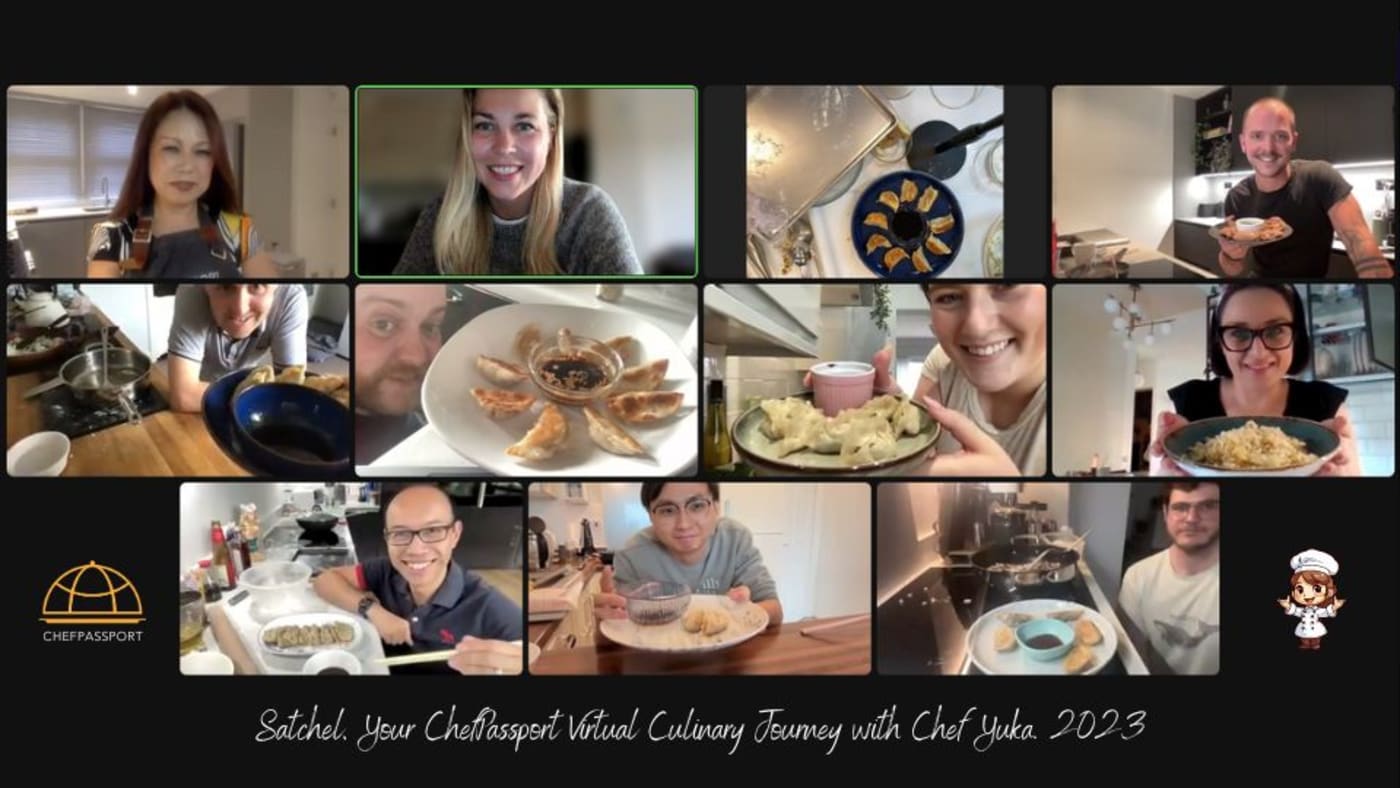
ChefPassport's virtual cooking classes bring your whole team into one kitchen over Zoom — ingredients shipped to each person's door and a professional chef guiding the cook in real time. The connection of a game, with a meal at the end.
Frequently asked questions
What are the best team building games to play on Zoom?
The reliable winners are trivia, Pictionary (using Zoom's whiteboard or annotate), charades, 'two truths and a lie', and a bingo round — all run with screen-share and the chat. For deeper bonding, breakout-room scavenger hunts and a hosted virtual cooking class work best.
How do you run a team building game on Zoom?
Start the meeting, use screen-share for any visuals (board, slides, music), and the chat for answers. Use breakout rooms to split larger groups so everyone participates, and appoint one host to keep score and pace. Enable 'share computer sound' for any game with audio.
What Zoom features help with team games?
Screen-share (with computer audio), breakout rooms (parallel small-group play), the whiteboard/annotate tools (drawing games), reactions and nonverbal feedback (voting, quick polls), and the built-in Polls feature for trivia and quizzes.
How long should a Zoom team building game last?
For a meeting warm-up, 10–15 minutes. For a dedicated social, 30–45 minutes with two or three different games keeps energy higher than one long session. Always brief the rules before you start the clock.
What's a good Zoom game for a large team?
Trivia and bingo scale best — run answers through the chat or Zoom Polls. For 20+ people, use breakout rooms so small groups play in parallel, then regroup to compare scores.
Can these Zoom games be used for virtual team building events?
Yes — all 12 games work well for virtual team building events of any size. For quick weekly sessions, pick short games like Rapid-fire "this or that" or Emoji story. For bigger milestones or onboarding, combine 2–3 games or consider a longer hosted experience like a virtual cooking class for a more memorable, facilitated event.
What's a quick zoom team building activity for a 15-minute break?
For a short 15-minute break, try Quick Pictionary on the Zoom whiteboard or a single round of Trivia. Both work as a quick zoom team building activity because they need zero prep, get everyone laughing, and fit neatly into a coffee break or transition between meetings.
How do I choose team building events that work well on Zoom?
Look for activities that lean into Zoom's native features rather than fight them. The best team building events for video use screen-share for visuals (like trivia slides or Pictionary), breakout rooms for small-group interaction, and the chat for rapid-fire answers. Avoid anything that requires complex physical coordination or relies on high production value — simplicity and interactivity win on Zoom.
Free guide
Team Building Menu & Pricing Guide
Menus, group sizes, formats and indicative pricing — everything you need to plan, in two PDFs. No spam, unsubscribe anytime.