
The problem with most virtual team building isn't the activities themselves — it's that they're designed to be watched, not experienced. Trivia nights, watching the same presentation, synchronised Netflix parties: none of these create the kind of shared memory that actually changes how a team feels about each other.
After running hundreds of virtual events across 50+ countries as a virtual team building activities company and refining our ideas for virtual team building activities — from year-round sessions to virtual holiday team building activities during peak seasons — here's what we've learned about what works and what doesn't.
Why most virtual team building fails
The core problem is passive consumption. When people watch a presenter, they're an audience — not a team. The activities that work share one characteristic: everyone does something with their hands simultaneously, and that shared doing creates real common ground.
The second failure mode is ignoring Zoom fatigue. An activity that would work brilliantly in person for 3 hours needs to be redesigned for 90 minutes online. Pacing, camera-off moments, and breakout room strategy all matter far more than the activity itself.
The top tier: activities that actually work
1. Virtual cooking classes
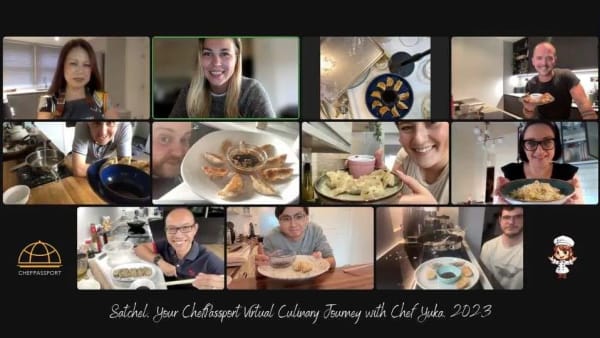
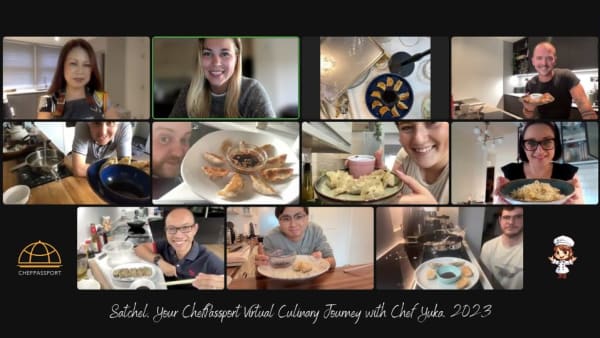
The gold standard for virtual team building. Everyone cooks the same dish simultaneously from their own kitchen — pasta, sushi, tacos, Thai curry — guided by a live professional chef. The physical engagement (kneading dough, rolling sushi) keeps people present, the gentle challenge creates conversation, and eating together at the end is genuinely social.
ChefPassport's virtual cooking classes run on Zoom or Teams with a chef plus a dedicated event producer — making them significantly more polished than one-person-with-a-camera alternatives. Ingredient kits can be delivered worldwide.
2. Online murder mystery events
Well-produced murder mystery events work because they require genuine collaboration and creative thinking. They're at their best with groups of 12–30; above that, coordination breaks down. Look for providers with professional actors rather than self-guided versions.
3. Virtual escape rooms
Browser-based escape rooms designed for remote teams (not repurposed single-player games) can be genuinely engaging. The best versions have a facilitator who adapts difficulty in real time. They work well for analytical or tech teams; less so for groups who prefer social over puzzle-solving.
4. Cocktail or mocktail making
Simple, fun, and works with a pre-delivered kit or ingredients people source themselves. Shorter than a cooking class (45–60 minutes), which makes it good for a post-meeting social rather than a standalone event.
5. Live online art classes
Watercolour, life drawing, or painting sessions guided by a live artist. Surprisingly popular with groups who resist more competitive formats. The finished piece becomes a conversation starter that persists after the event.
The middle tier: work with caveats
- Virtual trivia / quiz nights — entertaining but low bonding value. Good for a regular social touchpoint; not sufficient as the sole team building investment.
- Online board games (Skribbl, Jackbox) — works well for informal social hours, especially for gaming-adjacent teams. Loses novelty quickly if repeated.
- Virtual scavenger hunts — effective if well-designed, but quality varies enormously. Test the provider's format before committing.
- Fitness challenges (online HIIT, yoga) — great for teams with shared fitness culture; can feel exclusionary for others.
- Virtual wine or whisky tasting — requires kit delivery and works best as a senior/client event rather than all-hands.
What to avoid
- Passive webinars labelled as "team building" — if people are watching rather than doing, it's not team building.
- Icebreaker-only formats — 30 minutes of questions doesn't substitute for a shared experience.
- Anything requiring pre-work — events that need participants to prepare materials in advance suffer from uneven participation and resentment.
Practical tips for running a successful virtual event
- Send a detailed prep email 48–72 hours before — what to have ready, how to set up the camera, what to wear.
- Assign a dedicated tech host separate from the facilitator, so the facilitator can focus entirely on the group.
- Plan a 20-minute "eat together" moment at the end — the debrief over food is where the bonding actually happens.
- Record key moments (with consent) — a short highlight reel shared afterward extends the impact and makes it easier to justify budget next time.
Planning a team event?
ChefPassport runs hands-on cooking experiences for corporate teams — in person at Kachatelier, Luxembourg, and virtually worldwide. Instant price estimate on the site.
Frequently asked questions
Free guide
Team Building Menu & Pricing Guide
Menus, group sizes, formats and indicative pricing — everything you need to plan, in two PDFs. No spam, unsubscribe anytime.